Key Takeaways
HydroPort PWC lifts integrate easily with nearly any dock system.
Use hinge kits, gangways, or side-mount brackets for secure connection.
Floating PWC lifts simplify launching and protect your jet ski from damage.
Correct placement ensures easy boarding, access, and seasonal use.
ShoreMaster’s modular design makes connecting HydroPorts quick and reliable.
Why Upgrade with a HydroPort PWC Lift
Leaving PWCs on the water when not in use is a disservice to your investment. Within just 48–72 hours, an unsightly "scum line" will begin to form. Over a season, this can lead to hull blistering (osmosis), where water molecules penetrate the gel coat. Apart from being a nightmare to scrub off, this significantly hurts its resale value.
In the Great Lakes and many U.S. reservoirs, invasive species like zebra mussels can attach to intake grates or jet pumps within days, risking engine overheating. Even in pristine lakes, minerals can accelerate galvanic corrosion in submerged metal components, leading to seized bolts and degraded cooling passages over just a few seasons.
A HydroPort PWC lift mitigates all of these issues by storing your craft safely above the waterline.
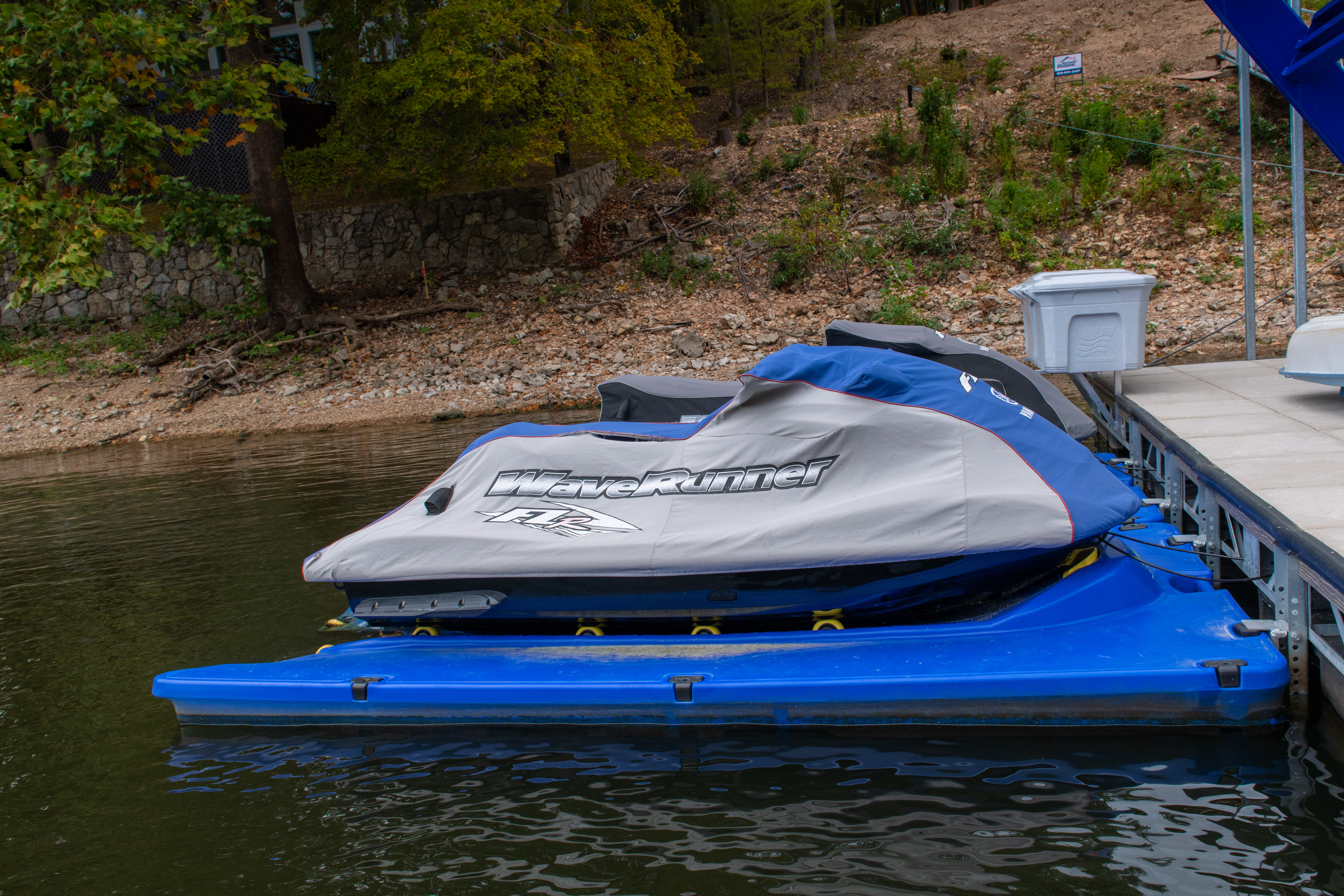
Designed for today’s larger, more powerful jet skis and personal watercraft, a HydroPort drive on PWC dock offers the easiest way to launch, store, and protect your fun machines. Its self-centering entry seamlessly guides PWCs into position with a gentle throttle, while adjustable, dual in-line rollers provide universal hull support.
Combined with wide slip-resistant walkways, stainless steel roller axles, and UV and impact-resistant high-density polyethylene construction, a HydroPort PWC lift delivers unmatched durability, stability, and ease of use. Whether you're a day-tripper or a waterfront property owner, if you own a personal watercraft, upgrading to a HydroPort is a no-brainer.
Checking Compatibility with Your Current Dock
The HydroPort jet ski floating dock series is highly versatile, designed to integrate with a wide range of dock types, setups, and installation requirements.
Fixed Docks and Seawalls: The HydroPort can be attached to fixed docks and seawalls using a Fixed Dock Mooring Kit. The kit includes specialized brackets and requires anchor bolts specific to your dock material (e.g., lag bolts for wood or concrete anchors for a seawall).
Floating Docks: The HydroPort Floating Mooring Kit allows the PWC dock to move with the water level, acting as a flexible hinge that absorbs movement.
Standing or Wheel-In Docks: You can connect HydroPort jet ski docks to a ShoreMaster Infinity RS4 or RS7 using pipe brackets or side-mount connectors integrated into the dock’s track system.
To ensure HydroPort works as designed, we recommend consulting an authorized dealer who can perform a site evaluation and recommend the optimal mounting solution for your specific waterfront setup.
Step-by-Step HydroPort Installation
Before installing a PWC port, check if your area has any permitting requirements or restrictions for installing PWC docks. In Florida, for example, you will likely need a permit to install floating vessel platforms and boat lifts in or over navigable areas (Florida Department of Environmental Protection, n.d.). Conversely, Michigan does not require a permit for a seasonal dock or boat hoist that is removed at the end of the boating season (State of Michigan, n.d.).
Space and Water Depth Requirements
Just like other leading jet ski dock options, HydroPort requires sufficient space for safe operation. Assess your waterfront setup and ensure you have enough space to maneuver the PWC on and off the port, with ample clearance from nearby vessels, piers, and other obstructions. For reference, the HydroPort Epic is 70" W x 160 ⅝" L x 17" H and weighs 430 lbs.
You will also need at least 12 to 18 inches of water depth for the PWC lift to function properly. If the area is too shallow, you may need to reposition the dock or dredge the bottom.
Choosing a HydroPort Model
With a capacity of 1,625 lbs, the HydroPort Extreme is perfect for owners of most standard-sized PWCs, easily handling popular models from Sea-Doo, Yamaha, and Kawasaki while providing excellent walk-around space and stability.
However, if you own a top-tier model like the Sea-Doo GTX Limited, Yamaha FX Limited SVHO, or a Kawasaki Ultra 310LX, the Epic’s 2,000-lb capacity provides the structural overhead that smaller ports lack.
Because it is a full foot wider than the Extreme, it is the best option for families, older riders, or anyone who values a rock-solid, extra-wide anti-skid walkway for safer boarding. The expanded surface area also makes it significantly easier to flush your engine, polish the hull, or perform routine checks, effectively encouraging regular maintenance.
Assembly and Installation
Installation instructions for a HydroPort PWC lift vary slightly depending on the specific model and dock type.
Assembly:
Bow Bumper: Screw the Bow Stop onto the HydroPort body using the provided bolts and washers.
Roller Assembly: Slide the axle retainer on one end of the axle. Slide one spacer onto the axle and through the wheel. Add two more spacers to the axle, then insert the axle retainer to complete the roller assembly.
Roller Installation: Snap the wheel assembly into the axle cavities. There are several axle locations provided, allowing you to custom-fit the roller supports to your PWC. It may take some trial and error to determine the optimal location for each roller.
Mooring Cavities: If you aren't using certain mooring points, insert the cap plugs into the cavities and tighten the screws until snug to prevent debris buildup. Avoid overtightening the screws. They only need to be tightened enough to retain the cap plug.
Installation:
Place the lock washer and the washer on both bolts.
Insert the mooring plug into the mooring cavity.
Hook the mooring bracket into the mooring cavity on the underside of the HydroPort.
Pivot the bracket up to the HydroPort. You may need a hammer/rubber mallet to tap the bracket into place.
Insert the bolt and washers into the mooring plug and tighten until the bracket is snug against the HydroPort. Be mindful of overtightening.
Drill four 3/8” holes into the dock face and attach the extended hinge mooring plate.
Note: The installation instructions above are for attaching the HydroPort Epic to a floating dock. On average, the HydroPort Epic takes 4 man-hours (2 people working 2 hours each) to assemble and install.
Common Dock Scenarios and Solutions
Because HydroPort PWC ports can be integrated into most existing dock setups or used as standalone drive-on jet ski docks, you can just as easily find them in lakefront homes as you would in marinas, resorts, and other waterfront establishments.
For rental fleets, resorts, or families with more than one jet ski, HydroPorts can be linked side‑by‑side to organize traffic flow and create a distinct zone for PWCs. You can even add boat dock ramp & gangways, creating a seamless walkway system that makes boarding and disembarking safe and efficient.
The walk-around surface area allows owners and mechanics to safely flush the engine, clean the hull, or perform routine inspections and maintenance while the craft is dry and stable, without hauling it to a garage. This reduces the need to haul your jet ski to a garage, encourages regular upkeep, and ultimately extends the life and performance of your PWC.
To learn more about the best boat dock accessories from ShoreMaster, visit an authorized dealer today. Enter your zip code in the dealer locator tool below, and you’ll get a list of ShoreMaster dealers near you, replete with their contact information and driving directions.
FAQs
Can HydroPorts attach to non-ShoreMaster docks?
Yes. HydroPorts are designed for universal compatibility with almost any dock type. Using specialized mounting kits, you can securely attach them to wood, aluminum, composite, or concrete docks, whether they are floating or fixed.
What tools do I need for installation?
Different PWC dock models and mounting hardware will require different tool sets. To give you an idea of what you might need, installing the HydroHoist Epic requires the following tools:
1/2” Drive ratchet (minimum 9-inch handle length for leverage)
Electric drill
Drill bits
Deep well sockets
Open-end or combination wrenches
#2 Phillips Screwdriver
Drift Pin or other hole aligning tool
5/32 Hex Key
J-Hook Connecting Kit Tool
Large Hammer
Knife or cutting tool
Measuring tape
Depending on your dock system, other tools may also be required.
How much weight can a HydroPort handle?
The HydroPort Extreme supports up to 1,625 lbs, ideal for most standard PWCs, while the HydroPort Epic offers a 2,000 lb capacity to accommodate today’s larger, high‑performance jet skis.
Can I move my HydroPort between docks?
Yes. HydroPorts are modular and relatively lightweight compared to traditional lifts, allowing them to be repositioned or moved between docks as needed. This makes them especially practical for seasonal use or owners with multiple waterfront properties.
How do I maintain my HydroPort lift?
Maintenance is minimal thanks to its UV‑ and impact‑resistant polyethylene construction. Simply spray it down periodically with fresh water to remove salt or algae buildup, and occasionally inspect the roller axles and mooring bolts to ensure everything remains tight and moves smoothly.
References:
Florida Department of Environmental Protection (n.d.). Dock Permitting in Florida, https://floridadep.gov/sites/default/files/SWD_Dock%20Permitting%20in%20Florida-D5_FINAL_0.pdf
State of Michigan (n.d.). Docks, Boat Hoists, and Swim Rafts, https://www.michigan.gov/-/media/Project/Websites/egle/Documents/Programs/WRD/Inland-Lakes-and-Streams/Docks-Boat-Hoists-Swim-Raft-Handout.pdf


